
Send the accounting records to Xero, Sage, or QuickBooks without retyping them. The sync is one way: this system pushes the documents, and the accounting package does not send data back.
You choose the invoices, credit notes, supplier documents, and payments to send. Customers and suppliers are created in the accounting package when their documents are sent. The local id is stored on that record so the same person is reused next time.
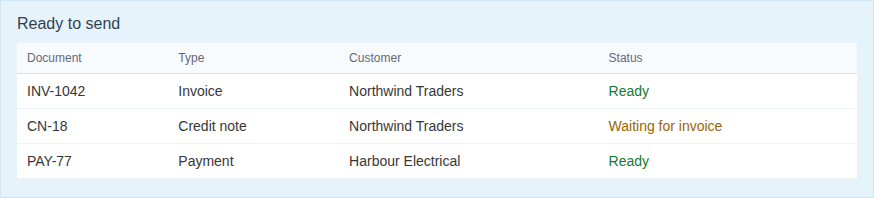
A document that cannot be sent yet, because its invoice is not in the accounting package, waits instead of failing the rest of the batch. You can send that one again after the invoice has gone through.
Customers are not emailed from Xero, Sage, or QuickBooks. Email and WhatsApp stay on this side.
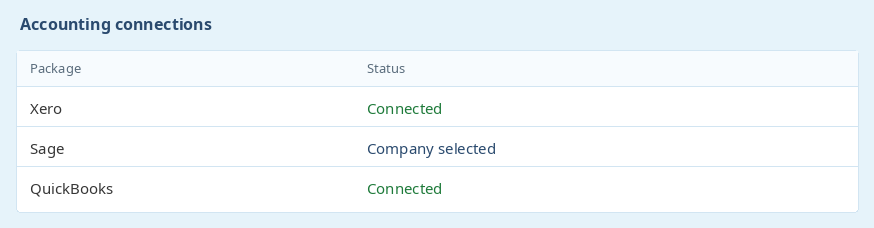
Each integration is switched on for the business and uses that package's own login. The connection is per business, so a second business on the same login connects on its own.
Sage asks you to pick the company and can reload the accounts and analysis categories. QuickBooks uses the Intuit app connection. Xero uses the Xero login for that organisation.
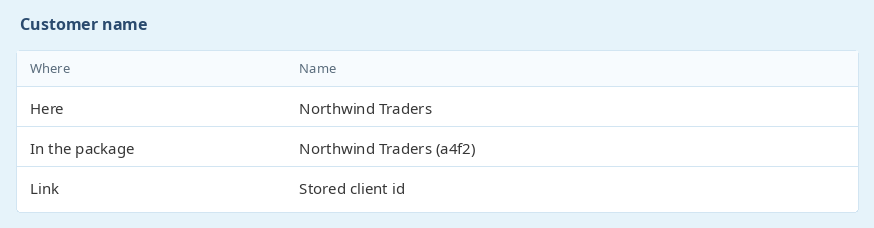
Accounting packages will not keep two customers with the same name. A short suffix is kept on the name so a client here does not collide with a customer that was already in the accounting file.
The suffix is only there so the names can both exist. The link back to the client here is the stored id, so the next document finds the same customer even if the display name looks slightly different.
Ready to get started? Sign Up for Free
previous WhatsAppnext Bank statement import
Noa Modukanene - Mdux-ICS (Pty) LtdWould like to use your site for everything!
Thank you Adriaan,
You the best.
NB: Have you thought about integrating payroll software please. We are using a different platform and would like to use your site for everything.